Interactive Reference Architecture
Click on the components or numbered steps below to explore how this architecture works.
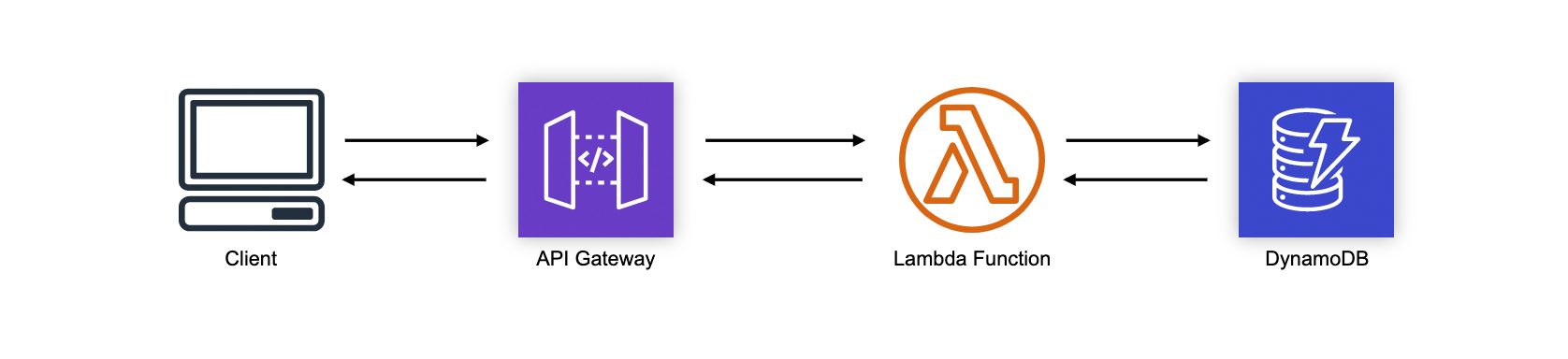
This is the most basic of patterns you're likely to see with serverless applications. The Simple Web Service fronts a Lambda function with an API Gateway. I've shown DynamoDB as the database here because it scales nicely with the high concurrency capabilities of Lambda.
Deploy this Pattern
Below are the basic configurations for deploying this pattern using different frameworks and platforms. Additional configuration for your environment will be necessary. The source files and additional examples are available in the GitHub repo.
-
SAM
-
Stackery
-
Serverless Framework
1service: simple-web-service2provider:3 name: aws4 runtime: nodejs12.x5 stage: ${opt:stage,'dev'}6 region: us-east-17 stackName: ${self:service}-${self:provider.stage}8 stackTags:9 SERVICE: ${self:service}10 httpApi:11 payload: '2.0'12 cors: true1314functions:15 GetUser:16 handler: index.handler17 memorySize: 102418 timeout: 619 tracing: Active20 environment:21 TABLE_NAME: !Ref Users22 TABLE_ARN: !GetAtt Users.Arn23 iamRoleStatementsName: ${self:service}-${self:provider.stage}-getuser-role24 iamRoleStatements:25 - Effect: Allow26 Action:27 - dynamodb:getItem28 - dynamodb:putItem29 - dynamodb:updateItem30 - dynamodb:deleteItem31 Resource:32 - !Join [ '/', [ !GetAtt Users.Arn, '*' ] ]33 - !GetAtt Users.Arn34 - Effect: Allow35 Action:36 - xray:PutTraceSegments37 - xray:PutTelemetryRecords38 Resource: "*"39 events:40 - httpApi:41 path: /user/{id}42 method: get4344plugins:45 - serverless-iam-roles-per-function4647resources:48 Resources:49 Users:50 Type: AWS::DynamoDB::Table51 Properties:52 AttributeDefinitions:53 - AttributeName: id54 AttributeType: S55 BillingMode: PAY_PER_REQUEST56 KeySchema:57 - AttributeName: id58 KeyType: HASH59 StreamSpecification:60 StreamViewType: NEW_AND_OLD_IMAGES -
Pulumi
1// Full example: https://github.com/jeremydaly/reference-architectures/tree/master/simple-web-service/pulumi23import * as aws from "@pulumi/aws";4import * as awsx from "@pulumi/awsx";56// Provision a DynamoDB Table.7const users = new aws.dynamodb.Table("users", {8 attributes: [{9 name: "id",10 type: "S",11 }],12 hashKey: "id",13 billingMode: "PAY_PER_REQUEST",14 streamViewType: "NEW_AND_OLD_IMAGES",15});1617// Create an API Gateway with a single /user/{id} route that uses the Table.18// This uses the default Lambda, IAM, and name settings; for full control over19// them, see the aws.lambda.CallbackFunction class, which can be allocated20// separately and passed instead of the inline eventHandler below.21const api = new awsx.apigateway.API("api", {22 routes: [{23 path: "/user/{id}",24 method: "GET",25 eventHandler: async (event, context) => {26 const tableName = users.name.get();27 const tableArn = users.arn.get();28 return { statusCode: 200, body: JSON.stringify(event) };29 },30 }]31});3233// Export the resulting API Gateway URL:34export const url = api.url; -
CDK
Are you a CDK Guru? Would you like to contribute patterns to the community? Check out the Github repo!